

Amazon collects vast amounts of data about shoppers and their actions. For sellers, this data matters because many ranking signals are not guesswork. They are measurable customer behaviors that Amazon records for each search and session. This guide explains what types of shopper data Amazon captures, how those signals feed ranking, and what concrete steps sellers can take to improve visibility and conversion.
Who this guide is for and why it matters
This guide is for Amazon sellers, brand managers, and marketers who want a clear playbook for improving organic rank and conversion. If you manage listings run advertising or plan external traffic this article shows which shopper behaviors matter most and how to test and act on them.
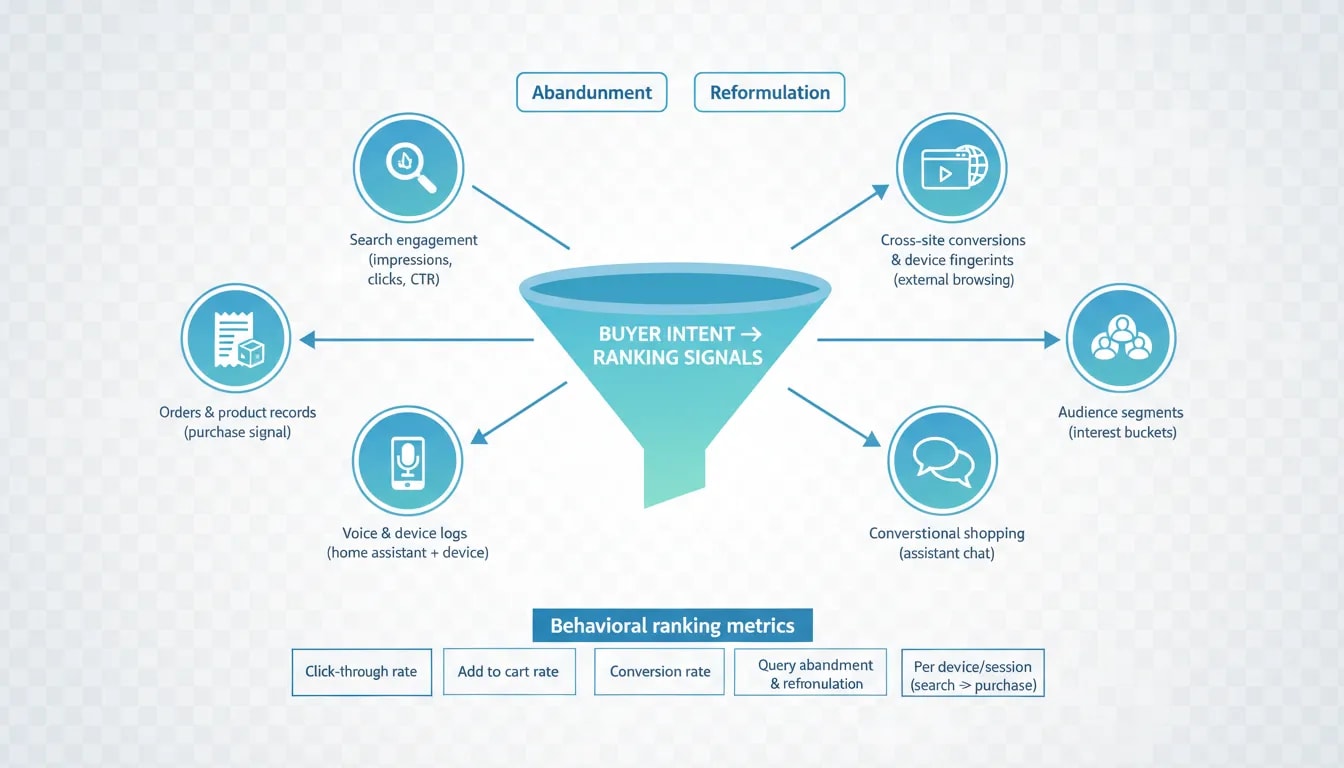
What Amazon shopper data includes and why each piece matters
Amazon stores many kinds of data. Below are the categories that matter most to sellers and what each reveals about buyer intent and ranking input.
Order and product record data
What it is
- Every order line with ASIN quantity price payment method shipping address and timestamps.
- Product serial numbers bundle and variant details when available.
Why it matters
- Purchase events are the terminal signal in any ranking model. Amazon links purchases back to the search or session that produced them.
- Order data lets models learn which product attributes correlate with successful outcomes for particular queries and customer types.
Search sessions and search engagement data
What it is
- Full sequences of shopper queries recorded as typed text.
- Per query events such as impressions clicks add to cart and purchases.
- Flags that mark whether the shopper abandoned the search or reformulated the query.
Why it matters
- Search engagement is the raw funnel data. Click through rate add to cart rate and conversion rate are tracked per query device and session.
- Query abandonment and query reformulation show when search results do not meet intent. Those negative signals are likely used to lower rank for listings that fail to satisfy.
Voice and device logs from home assistants
What it is
- Voice transcripts device state changes and timestamps for smart home actions.
- Voice metrics such as sentiment or whisper detection in some interactions.
Why it matters
- Voice queries tend to be intent rich and conversational. They reveal how people describe problems and desired outcomes in natural language.
- Device state data builds profiles such as routines and context. That can shape personalization and recommendations.
Cross site conversion events and device fingerprints
What it is
- Records that show conversions or browsing activity on non Amazon sites tied to device or browser fingerprints.
- Some events include currency quantity and referring app or site.
Why it matters
- Amazon tracks external browsing and purchases to build a broader view of shopper behavior and intent.
- External events can be used to attribute conversions and to create audiences for advertising and ranking models.
Audience segments and behavior classifications
What it is
- Pre built segments such as age range interest buckets purchase intent and category affinities.
- Lists of advertisers that include a shopper in targeted audiences.
Why it matters
- Amazon predicts what a shopper will buy before they type a query. Audience profiles feed personalized rankings and recommendations.
- Sellers can use these segments in advertising but must also design listings that match the language the audience uses.
Conversational shopping data from assistants and chat agents
What it is
- Logs that record a chat or voice exchange between a shopper and a shopping assistant.
- These sessions capture question follow up and the reasoning a customer uses when choosing a product.
Why it matters
- Conversational signals capture the why behind a purchase. That is the richest form of intent data because it links problems to solutions in natural language.
- This data can drive intent maps that match reasons to buy with product attributes and listing language.

How Amazon turns shopper data into ranking signals
Amazon does not rank by keyword density alone. The system uses measurable shopper responses to search results as features in ranking models. Here are the key behavioral signals that directly influence rank.
Click through rate
What it is The share of times a listing is clicked when it appears for a given search.
Why it matters If users do not click your listing Amazon records that outcome per query and may treat it as a poor match for that query. High click through rate signals relevance and interest.
Add to cart rate
What it is The share of listing clicks that result in an add to cart event.
Why it matters This measures how well your page content and price convince users to move toward purchase after they click. It is a mid funnel gate that influences ranking models.
Conversion rate
What it is The share of sessions or clicks that convert to purchases.
Why it matters Conversion is the terminal signal. Models learn which listings convert for which queries and devices and adjust rank accordingly.
Query abandonment and query reformulation
What they are Flags that show when users leave a search without clicking anything or when they change their search terms after seeing results.
Why they matter These are negative intent signals. If a query repeatedly results in abandonment or reformulation when a listing appears Amazon can infer that the listing set did not meet shopper need and may reduce visibility.
Per device and per session granularity
All of the above signals are tracked at fine granularity. Ranking models can evaluate performance by device type marketplace and session history. This allows Amazon to personalize results and to treat the same keyword differently depending on context.
Intent mapping from search to purchase
Amazon uses large scale pairing of search queries with subsequent purchases to build intent maps. These maps match reasons to buy with products and with the language shoppers use when describing their need. That means listings that speak to why buyers purchase will match intent better than listings that only list specs.

Practical seller actions step by step
Below are concrete steps sellers can take now to align listings and experiments with the behavior Amazon is tracking.
1 Test and optimize your main image first
Why The main image is the first trigger for click through rate. If users skip your listing you fail the first gate.
How
- Run a split test for your main image on traffic heavy keywords. Use a tool or a controlled external channel to send traffic to two detail pages and measure click through and conversion differences.
- Keep image changes simple. Test a clear product shot plain background copy overlays that highlight one core benefit and lifestyle images that show usage context.
- Measure customer behavior not just sessions. A winning image should raise CTR without causing returns or poor ratings.
2 Audit keywords with high impressions and low clicks or high abandonment
Why Those keywords produce negative data that can reduce rank.
How
- Pull search query performance reports and list keywords with high impressions low click through and high abandonment or high bounce.
- For each keyword ask whether your title image price and star rating match buyer expectation. If they do not rewrite the elements to reflect intent.
- Use targeted experiments. Change the title or image for a small period and watch CTR and add to cart rate for that keyword.
3 Convert spec language to purchase reasons in titles bullets and backend fields
Why Models trained on search to purchase pairs match reasons not just specs.
How
- Start with the top three reasons customers buy your product. These may be use case price point flavor or problem solved.
- Rewrite your title to include one clear benefit and one key attribute. Keep title brand and flavor or size minimal and make the core benefit prominent.
- Write bullets that answer why someone would pick this product over an alternative. Put the top buyer objections first and show how your product solves them.
4 Use review content to harvest language that matches buyer intent
Why Customer reviews often contain the exact words buyers use to describe problems solutions and expectations.
How
- Scan reviews and collect phrases that describe why customers bought or what they wanted to avoid.
- Incorporate high frequency buyer phrases into bullets and A plus content while staying truthful and compliant.
- Use review highlights as proof points for the benefit claims in your listing.
5 Drive controlled external traffic to influence ranking
Why External traffic is a strong signal when it leads to clicks and purchases. It can jumpstart rank for targeted keywords.
How
- Create landing pages that match the search intent language you want to own and that send users straight to your Amazon detail page.
- Measure the full funnel. External traffic matters only if it produces clicks and purchases on Amazon. Track conversion rate and returns for that traffic.
- Avoid driving low quality clicks that inflate impressions without conversions. That creates negative signals.
6 Request and analyze your shopper data from Amazon
Why The data export is the same schema Amazon uses to train models. Seeing it lets you find which queries generate negative signals for your listings.
How Step by step
- Sign in to your Amazon account and find the privacy or data access section for your shopper account. Request a full copy of your shopper data. Expect a packaged export containing many files in CSV JSON and audio formats.
- Open search engagement and detailed page impressions files. Look for records that list queries impressions clicks add to cart and purchase events. Identify queries that show impressions but no clicks or that show query abandonment.
- Open advertising conversion events. These can reveal cross site signals and conversion context for traffic that originated off Amazon.
- Open audience and behavior files to see which segments Amazon assigns to shoppers who visit your listings.
- Use spreadsheet tools Python or JSON tools to filter sort and aggregate by query device and date.
7 Build a simple analysis plan
What to compute
- CTR per keyword equals clicks divided by impressions.
- Add to cart rate equals adds divided by clicks.
- Conversion rate equals purchases divided by clicks or purchases divided by sessions depending on your data.
- Abandonment rate equals queries marked abandoned divided by total queries for the same keyword.
How to act
- For keywords with high abandonment improve result set match by changing title image or price.
- For keywords with good CTR but low add to cart rate rework bullets images and reviews to reduce friction.
- For keywords with low CTR but reasonable impressions test alternative main images and title phrasing that reflect the buyer language in reviews and in conversational queries.
8 Prepare listings for conversational shopping
Why Conversational assistants and chat agents produce queries that are long natural and reason based. Models that use that data match products by problem solving language.
How
- Include short natural language phrases in your product description and A plus content that answer typical buyer questions.
- Create an FAQ on the detail page that echoes the phrasing shoppers use when they voice a problem.
- Use customer questions and answers as a source of conversational phrasing to include in backend search terms and content where allowed.
Practical listing examples
Below are concise before and after examples that show how to move from spec driven language to reason to buy language.
Example 1 protein powder
Before
- Whey protein isolate 30 grams per serving chocolate 2 pound tub gluten free
After
- Smooth chocolate whey protein isolate 30 g per scoop mixes clean no chalky aftertaste gluten free 2 lb
Note how the after version highlights the core reason a buyer might reject similar products no chalky taste and easy mixing.
Example 2 cordless vacuum
Before
- 120 AW suction 45 minute runtime HEPA filter LED light
After
- Powerful suction for pet hair cleans corners and stairs removes dust without frequent filter changes up to 45 minutes run time
The after version speaks to the problem the buyer wants solved not just the technical numbers.

Checklist for a listing audit that maps to shopper signals
- Main image test Have you tested at least two main images recently?
- Keyword impression audit Do you have a list of keywords with impressions low click through or high abandonment?
- Title and image intent match For top keywords does the title and main image reflect why a shopper would buy?
- Bullet proof points Do your bullets answer buyer objections and show benefits drawn from reviews?
- Review mining Have you extracted common purchase reasons from reviews and Q and A?
- External traffic plan Do you have a controlled external traffic test with measurable conversion outcome?
- Conversational content Does your content include short natural language answers for common buyer questions?
Pitfalls common mistakes and things to watch
1 Prioritizing impressions over behavior
High impressions mean nothing if click through add to cart and conversion rates are low. Ranking models care about behavioral outcomes not just visibility.
2 Over optimizing for clicks at the cost of conversion
Click bait images or titles can raise CTR temporarily but lead to high return rates and negative reviews. Balance attraction with truthful representation of the product.
3 Relying solely on paid advertising
PPC can drive visibility but if the listing fails to convert the model will treat paid traffic differently. Use ads to test page changes but optimize the page itself.
4 Ignoring device and session context
A listing that converts well on desktop may perform poorly on mobile for voice shopping or in app browsing. Review metrics at device level and adjust content accordingly.
5 Misreading correlation as causation
Rank changes can follow many signals. When a change in rank follows an experiment isolate variables and run controlled tests rather than assuming one change caused the effect.
6 Mishandling shopper data and privacy
Sellers must not attempt to collect personal shopper data off platform in ways that violate law or Amazon policy. Use the data Amazon provides about your own shopper behavior within policy limits and avoid building profiles that misuse identity details.
How long to wait and how to measure success
Behavioral signals update at different cadences. Click through changes can show impact in days while conversion and ranking changes can take weeks. Use short term experiments to measure CTR and add to cart and allow at least two to four weeks to measure the impact on rank.
Key metrics to track
- CTR for target queries and for the listing overall
- Add to cart rate per click
- Conversion rate per click and per session
- Returns and negative reviews that may offset conversion gains
- Keyword rank movement for high value queries

Tools and methods to analyze large exports
Amazon shopper exports can be large and contain many file types. Use these tools and methods to extract actionable signals.
- Spreadsheet tools Use Excel or Google Sheets for small to medium sized CSV files.
- Command line tools Use simple CSV filters to preview large files and extract columns of interest.
- JSON tools Use JSON viewers or lightweight tools to inspect nested structures in JSON files.
- Python or R Use pandas or tidyverse to load filter group and aggregate by query device and date.
- AI summarization For very large exports use a local or cloud model to summarize patterns but validate any suggestions with raw counts.
Ethics and policy considerations
Sellers must respect shopper privacy and platform rules. Use shopper behavior data only as Amazon permits and avoid scraping or collecting personal identifiers. When testing external traffic follow ad platform policies and disclose affiliate relationships when required by law.
Key takeaways
- Amazon records fine grained shopper behavior at the query and session level. Click through add to cart conversion abandonment and reformulation are core signals.
- Ranking models prioritize intent matches. Listings that explain why a customer buys will match intent better than listings that only list specs.
- Main image matters more than most sellers give it credit for. Test images to improve CTR but avoid misrepresentation.
- Ask for your shopper data export analyze search engagement and impression records to find negative signals and hidden opportunities.
- Use controlled external traffic to drive meaningful outcomes not just impressions and track the full funnel once shoppers reach Amazon.
How do I request my Amazon shopper data
Sign in to your Amazon account go to privacy or data access settings and choose the option to request your data. Request the full account export which can include CSV JSON and audio files. Amazon will prepare the files and provide a download link. Preparation can take several days. Once you have the files use spreadsheet or JSON tools to inspect search engagement and detailed page impression data.
What fields should I look for in the export
Focus on search engagement and page impression files. Look for columns that show query text impressions clicks add to cart and purchase events. Also look for flags or fields that mark query abandoned or query reformulated. Audience files reveal segments assigned to shoppers. Advertising conversion files show cross site events and device context. Use these fields to compute CTR add to cart rate and conversion rate by query and device.

Will external traffic always improve organic rank
Not always. External traffic helps when it produces clicks and conversions on Amazon. Traffic that generates impressions without clicks or that causes high return rates can create negative signals. Use targeted external campaigns that send relevant shoppers to listings optimized to convert.
How often should I request my data
Once a year is a sensible minimum. Request more often if you plan major experiments or if you need to audit performance after listing changes. Keep in mind that data requests can take time to prepare.
Can I see conversational assistant transcripts in my export
Exports can contain records that show a conversation occurred and metadata such as timestamps marketplace and session id. In some cases the actual conversational text may be withheld from the export. However aggregated patterns and behavior signals derived from conversational sessions can appear in other files used to train intent mapping systems.
How do I reduce query abandonment for my listings
Start by matching the main image title and price to buyer expectations for the query. If buyers are leaving without clicking you are failing the first gate. Run image tests rephrase titles to reflect buyer language and check price competitiveness. Make sure the listing landing page loads quickly and that the first fold shows key benefits and social proof.
Are there legal risks when I analyze shopper exports
Use your own shopper export only for analysis and optimization. Do not attempt to combine exported data with other personal data to create identified customer profiles. Follow Amazon policies and applicable privacy laws when handling sensitive data. If you process exports in cloud services ensure secure storage and limit access.
Final word
Amazon ranking is less a mysterious black box and more a system that scores real shopper behavior. When you optimize for the measurable steps a shopper takes from query to purchase you reduce guesswork. Test images and titles use review language to surface buyer reasons and analyze your data to find the negative signals that are burying your listings. The sellers who win will be the ones who treat Amazon as a behavior driven search engine and who design listings to match how people describe the problems they want solved.
